ラベル
- Windows設定/情報 (88)
- メディア再生/編集 (64)
- インターネット通信 (43)
- PCハードウェアツール (39)
- ファイル管理/バックアップ (20)
- 分野アプリケーション (19)
- 大事件 (10)
- DOS (4)
- Linux (4)
- iPod (4)
Free Boot Disks
Free Boot Disks
http://www.bootdisk.com/bootdisk.htm
Windows 98 SE OEM | Mirror1 | Mirror2
Windows 98 SE Custom, No Ramdrive | Mirror1 | Mirror2
DOS 6.22 | Mirror1 | Mirror2
DOS 6.22 5 1/4 1.2 meg disk | Mirror
http://www.bootdisk.com/bootdisk.htm
Windows 98 SE OEM | Mirror1 | Mirror2
Windows 98 SE Custom, No Ramdrive | Mirror1 | Mirror2
DOS 6.22 | Mirror1 | Mirror2
DOS 6.22 5 1/4 1.2 meg disk | Mirror
ラベル:
DOS
GRUB and RawWrite
GNU GRUB
http://www.gnu.org/software/grub/
http://www.gnu.org/
ftp://alpha.gnu.org/gnu/grub/
http://www.atmarkit.co.jp/flinux/rensai/linuxtips/800grubbootfd.html
ftp://alpha.gnu.org/gnu/grub/grub-0.97-i386-pc.ext2fs
GRUBの起動ディスクを作成するには
http://uranus.chrysocome.net/linux/rawwrite.htm
RawWrite for Windows

download
http://www.gnu.org/software/grub/
http://www.gnu.org/
ftp://alpha.gnu.org/gnu/grub/
http://www.atmarkit.co.jp/flinux/rensai/linuxtips/800grubbootfd.html
ftp://alpha.gnu.org/gnu/grub/grub-0.97-i386-pc.ext2fs
GRUBの起動ディスクを作成するには
http://uranus.chrysocome.net/linux/rawwrite.htm
RawWrite for Windows

download
ラベル:
Linux
EFI Shell スクリーンショット
EFI 対応するBIOSで、EFI Shell アプリケーション
EFIBIOSスクリーンショット作成するアプリケーション。EFI Screen AP.zip
Shellx64.efi Shell
screen.efi アプリケーション1、同じファイル名で上書きされます。
キー [F12]
screen_new.efi アプリケーション2、連番のファイル名で保存されます。
キー [CTRL]+[ALT]+[F9]
http://coolaler.com/archive/index.php/t-263606.html
ラベル:
PCハードウェアツール
Windows XP のシステム ディスクを他のコンピューターに移動した後に STOP 0x0000007B エラーが表示される
Windows Registry Editor Version 5.00
[HKEY_LOCAL_MACHINE\SYSTEM\CurrentControlSet\Control\CriticalDeviceDatabase\primary_ide_channel]
"ClassGUID"="{4D36E96A-E325-11CE-BFC1-08002BE10318}"
"Service"="atapi"
[HKEY_LOCAL_MACHINE\SYSTEM\CurrentControlSet\Control\CriticalDeviceDatabase\secondary_ide_channel]
"ClassGUID"="{4D36E96A-E325-11CE-BFC1-08002BE10318}"
"Service"="atapi"
[HKEY_LOCAL_MACHINE\SYSTEM\CurrentControlSet\Control\CriticalDeviceDatabase\*pnp0600]
"ClassGUID"="{4D36E96A-E325-11CE-BFC1-08002BE10318}"
"Service"="atapi"
[HKEY_LOCAL_MACHINE\SYSTEM\CurrentControlSet\Control\CriticalDeviceDatabase\*azt0502]
"ClassGUID"="{4D36E96A-E325-11CE-BFC1-08002BE10318}"
"Service"="atapi"
[HKEY_LOCAL_MACHINE\SYSTEM\CurrentControlSet\Control\CriticalDeviceDatabase\gendisk]
"ClassGUID"="{4D36E967-E325-11CE-BFC1-08002BE10318}"
"Service"="disk"
[HKEY_LOCAL_MACHINE\SYSTEM\CurrentControlSet\Control\CriticalDeviceDatabase\pci#cc_0101]
"ClassGUID"="{4D36E96A-E325-11CE-BFC1-08002BE10318}"
"Service"="pciide"
[HKEY_LOCAL_MACHINE\SYSTEM\CurrentControlSet\Control\CriticalDeviceDatabase\pci#ven_0e11&dev_ae33]
"ClassGUID"="{4D36E96A-E325-11CE-BFC1-08002BE10318}"
"Service"="pciide"
[HKEY_LOCAL_MACHINE\SYSTEM\CurrentControlSet\Control\CriticalDeviceDatabase\pci#ven_1039&dev_0601]
"ClassGUID"="{4D36E96A-E325-11CE-BFC1-08002BE10318}"
"Service"="pciide"
[HKEY_LOCAL_MACHINE\SYSTEM\CurrentControlSet\Control\CriticalDeviceDatabase\pci#ven_1039&dev_5513]
"ClassGUID"="{4D36E96A-E325-11CE-BFC1-08002BE10318}"
"Service"="pciide"
[HKEY_LOCAL_MACHINE\SYSTEM\CurrentControlSet\Control\CriticalDeviceDatabase\pci#ven_1042&dev_1000]
"ClassGUID"="{4D36E96A-E325-11CE-BFC1-08002BE10318}"
"Service"="pciide"
[HKEY_LOCAL_MACHINE\SYSTEM\CurrentControlSet\Control\CriticalDeviceDatabase\pci#ven_105a&dev_4d33]
"ClassGUID"="{4D36E96A-E325-11CE-BFC1-08002BE10318}"
"Service"="pciide"
[HKEY_LOCAL_MACHINE\SYSTEM\CurrentControlSet\Control\CriticalDeviceDatabase\pci#ven_1095&dev_0640]
"ClassGUID"="{4D36E96A-E325-11CE-BFC1-08002BE10318}"
"Service"="pciide"
[HKEY_LOCAL_MACHINE\SYSTEM\CurrentControlSet\Control\CriticalDeviceDatabase\pci#ven_1095&dev_0646]
"ClassGUID"="{4D36E96A-E325-11CE-BFC1-08002BE10318}"
"Service"="pciide"
[HKEY_LOCAL_MACHINE\SYSTEM\CurrentControlSet\Control\CriticalDeviceDatabase\pci#ven_1095&dev_0646&REV_05]
"ClassGUID"="{4D36E96A-E325-11CE-BFC1-08002BE10318}"
"Service"="pciide"
[HKEY_LOCAL_MACHINE\SYSTEM\CurrentControlSet\Control\CriticalDeviceDatabase\pci#ven_1095&dev_0646&REV_07]
"ClassGUID"="{4D36E96A-E325-11CE-BFC1-08002BE10318}"
"Service"="pciide"
[HKEY_LOCAL_MACHINE\SYSTEM\CurrentControlSet\Control\CriticalDeviceDatabase\pci#ven_1095&dev_0648]
"ClassGUID"="{4D36E96A-E325-11CE-BFC1-08002BE10318}"
"Service"="pciide"
[HKEY_LOCAL_MACHINE\SYSTEM\CurrentControlSet\Control\CriticalDeviceDatabase\pci#ven_1095&dev_0649]
"ClassGUID"="{4D36E96A-E325-11CE-BFC1-08002BE10318}"
"Service"="pciide"
[HKEY_LOCAL_MACHINE\SYSTEM\CurrentControlSet\Control\CriticalDeviceDatabase\pci#ven_1097&dev_0038]
"ClassGUID"="{4D36E96A-E325-11CE-BFC1-08002BE10318}"
"Service"="pciide"
[HKEY_LOCAL_MACHINE\SYSTEM\CurrentControlSet\Control\CriticalDeviceDatabase\pci#ven_10ad&dev_0001]
"ClassGUID"="{4D36E96A-E325-11CE-BFC1-08002BE10318}"
"Service"="pciide"
[HKEY_LOCAL_MACHINE\SYSTEM\CurrentControlSet\Control\CriticalDeviceDatabase\pci#ven_10ad&dev_0150]
"ClassGUID"="{4D36E96A-E325-11CE-BFC1-08002BE10318}"
"Service"="pciide"
[HKEY_LOCAL_MACHINE\SYSTEM\CurrentControlSet\Control\CriticalDeviceDatabase\pci#ven_10b9&dev_5215]
"ClassGUID"="{4D36E96A-E325-11CE-BFC1-08002BE10318}"
"Service"="pciide"
[HKEY_LOCAL_MACHINE\SYSTEM\CurrentControlSet\Control\CriticalDeviceDatabase\pci#ven_10b9&dev_5219]
"ClassGUID"="{4D36E96A-E325-11CE-BFC1-08002BE10318}"
"Service"="pciide"
[HKEY_LOCAL_MACHINE\SYSTEM\CurrentControlSet\Control\CriticalDeviceDatabase\pci#ven_10b9&dev_5229]
"ClassGUID"="{4D36E96A-E325-11CE-BFC1-08002BE10318}"
"Service"="pciide"
[HKEY_LOCAL_MACHINE\SYSTEM\CurrentControlSet\Control\CriticalDeviceDatabase\pci#ven_1106&dev_0571]
"Service"="pciide"
"ClassGUID"="{4D36E96A-E325-11CE-BFC1-08002BE10318}"
[HKEY_LOCAL_MACHINE\SYSTEM\CurrentControlSet\Control\CriticalDeviceDatabase\pci#ven_8086&dev_1222]
"ClassGUID"="{4D36E96A-E325-11CE-BFC1-08002BE10318}"
"Service"="intelide"
[HKEY_LOCAL_MACHINE\SYSTEM\CurrentControlSet\Control\CriticalDeviceDatabase\pci#ven_8086&dev_1230]
"ClassGUID"="{4D36E96A-E325-11CE-BFC1-08002BE10318}"
"Service"="intelide"
[HKEY_LOCAL_MACHINE\SYSTEM\CurrentControlSet\Control\CriticalDeviceDatabase\pci#ven_8086&dev_2411]
"ClassGUID"="{4D36E96A-E325-11CE-BFC1-08002BE10318}"
"Service"="intelide"
[HKEY_LOCAL_MACHINE\SYSTEM\CurrentControlSet\Control\CriticalDeviceDatabase\pci#ven_8086&dev_2421]
"ClassGUID"="{4D36E96A-E325-11CE-BFC1-08002BE10318}"
"Service"="intelide"
[HKEY_LOCAL_MACHINE\SYSTEM\CurrentControlSet\Control\CriticalDeviceDatabase\pci#ven_8086&dev_7010]
"ClassGUID"="{4D36E96A-E325-11CE-BFC1-08002BE10318}"
"Service"="intelide"
[HKEY_LOCAL_MACHINE\SYSTEM\CurrentControlSet\Control\CriticalDeviceDatabase\pci#ven_8086&dev_7111]
"ClassGUID"="{4D36E96A-E325-11CE-BFC1-08002BE10318}"
"Service"="intelide"
[HKEY_LOCAL_MACHINE\SYSTEM\CurrentControlSet\Control\CriticalDeviceDatabase\pci#ven_8086&dev_7199]
"ClassGUID"="{4D36E96A-E325-11CE-BFC1-08002BE10318}"
"Service"="intelide"
;Add driver for Atapi (requires Atapi.sys in Drivers directory)
[HKEY_LOCAL_MACHINE\SYSTEM\CurrentControlSet\Services\atapi]
"ErrorControl"=dword:00000001
"Group"="SCSI miniport"
"Start"=dword:00000000
"Tag"=dword:00000019
"Type"=dword:00000001
"DisplayName"="Standard IDE/ESDI Hard Disk Controller"
"ImagePath"=hex(2):53,00,79,00,73,00,74,00,65,00,6d,00,33,00,32,00,5c,00,44,00,\
52,00,49,00,56,00,45,00,52,00,53,00,5c,00,61,00,74,00,61,00,70,00,69,00,2e,\
00,73,00,79,00,73,00,00,00
;Add driver for intelide (requires intelide.sys in drivers directory)
[HKEY_LOCAL_MACHINE\SYSTEM\CurrentControlSet\Services\IntelIde]
"ErrorControl"=dword:00000001
"Group"="System Bus Extender"
"Start"=dword:00000000
"Tag"=dword:00000004
"Type"=dword:00000001
"ImagePath"=hex(2):53,00,79,00,73,00,74,00,65,00,6d,00,33,00,32,00,5c,00,44,00,\
52,00,49,00,56,00,45,00,52,00,53,00,5c,00,69,00,6e,00,74,00,65,00,6c,00,69,\
00,64,00,65,00,2e,00,73,00,79,00,73,00,00,00
;Add driver for Pciide (requires Pciide.sys and Pciidex.sys in Drivers directory)
[HKEY_LOCAL_MACHINE\SYSTEM\CurrentControlSet\Services\PCIIde]
"ErrorControl"=dword:00000001
"Group"="System Bus Extender"
"Start"=dword:00000000
"Tag"=dword:00000003
"Type"=dword:00000001
"ImagePath"=hex(2):53,00,79,00,73,00,74,00,65,00,6d,00,33,00,32,00,5c,00,44,00,\
52,00,49,00,56,00,45,00,52,00,53,00,5c,00,70,00,63,00,69,00,69,00,64,00,65,\
00,2e,00,73,00,79,00,73,00,00,00
ラベル:
Windows設定/情報
MD5sums 1.2 - Generate MD5 hashes of files (with progress indicator)
http://www.pc-tools.net/win32/md5sums/
ラベル:
ファイル管理/バックアップ
PDF-XChange Viewer
PDF-XChange Viewer
http://www.tracker-software.com/product/pdf-xchange-viewer
ラベル:
ファイル管理/バックアップ
Syslinux
Syslinux
syslinux.exe
http://www.syslinux.org/wiki/index.php/The_Syslinux_Project
The Syslinux Project
http://www.syslinux.org/wiki/index.php/SYSLINUX
Creating a Bootable Disk
http://www.kernel.org/pub/linux/utils/boot/syslinux/
syslinux-4.05.zip
SYSLINUX.CFG
DEFAULT linux
LABEL linux
SAY Now booting the kernel from SYSLINUX...
KERNEL vmlinuz.img
APPEND ro root=/dev/sda1 initrd=initrd.img
BOOT image Bootstrap program (.bs, .bin)
BSS image BSS image (.bss)
PXE image PXE Network Bootstrap Program (.0)
FDIMAGE image Floppy disk image (.img)
MEMTEST 例
PROMPT 1
TIMEOUT 60
DISPLAY boot.txt
DEFAULT 1
LABEL 1
kernel memtest
LABEL 2
kernel memtest.p
BOOT.TXT
Memtest86 Version 4.0a CD
------------------------
Select Version:
1) Boot V4.0a (Default)
2) Boot V3.5b (Previous Version)
syslinux.exe
http://www.syslinux.org/wiki/index.php/The_Syslinux_Project
The Syslinux Project
http://www.syslinux.org/wiki/index.php/SYSLINUX
Creating a Bootable Disk
http://www.kernel.org/pub/linux/utils/boot/syslinux/
syslinux-4.05.zip
SYSLINUX.CFG
DEFAULT linux
LABEL linux
SAY Now booting the kernel from SYSLINUX...
KERNEL vmlinuz.img
APPEND ro root=/dev/sda1 initrd=initrd.img
BOOT image Bootstrap program (.bs, .bin)
BSS image BSS image (.bss)
PXE image PXE Network Bootstrap Program (.0)
FDIMAGE image Floppy disk image (.img)
MEMTEST 例
PROMPT 1
TIMEOUT 60
DISPLAY boot.txt
DEFAULT 1
LABEL 1
kernel memtest
LABEL 2
kernel memtest.p
BOOT.TXT
Memtest86 Version 4.0a CD
------------------------
Select Version:
1) Boot V4.0a (Default)
2) Boot V3.5b (Previous Version)
ラベル:
Linux
HP USB Disk Storage Format Tool
起動可能なUSBメモリの作成
How to Make a MS-DOS Bootable Flash Drive
http://www.sevenforums.com/tutorials/46707-ms-dos-bootable-flash-drive-create.html
Bootable USB-Drive Utility
http://www.911cd.net/forums/lofiversion/index.php/t21702.html
http://qq17818.blogspot.jp/2012/06/usb.html
利用HPUSBFW製作可開機的USB隨身碟
http://520.be/745-%E5%88%A9%E7%94%A8hpusbfw%E8%A3%BD%E4%BD%9C%E5%8F%AF%E9%96%8B%E6%A9%9F%E7%9A%84usb%E9%9A%A8%E8%BA%AB%E7%A2%9F.html
http://www.hiren.info/pages/bootcd-on-usb-disk
How to Make a MS-DOS Bootable Flash Drive
http://www.sevenforums.com/tutorials/46707-ms-dos-bootable-flash-drive-create.html
Bootable USB-Drive Utility
http://www.911cd.net/forums/lofiversion/index.php/t21702.html
http://qq17818.blogspot.jp/2012/06/usb.html
利用HPUSBFW製作可開機的USB隨身碟
http://520.be/745-%E5%88%A9%E7%94%A8hpusbfw%E8%A3%BD%E4%BD%9C%E5%8F%AF%E9%96%8B%E6%A9%9F%E7%9A%84usb%E9%9A%A8%E8%BA%AB%E7%A2%9F.html
http://www.hiren.info/pages/bootcd-on-usb-disk
ラベル:
PCハードウェアツール
Windows 8 Release Preview ISO イメージ
http://windows.microsoft.com/ja-JP/windows-8/iso
***システム要件
Windows 8 Release Preview は、Windows 7 が動作するのと同じハードウェアで
問題なく動作します。
•プロセッサ: 1 GHz 以上
•RAM:1 GB (32 ビット) または 2 GB (64 ビット)
•ハード ディスクの空き領域: 16 GB (32 ビット) または 20 GB (64 ビット)
•グラフィック カード: Microsoft DirectX 9 グラフィックス デバイス (WDDM
ドライバー付き)
***特定の機能を使用するための追加要件:
•タッチを使う場合は、タブレット、またはマルチタッチに対応しているモニター。
•Windows Store にアクセスし、アプリをダウンロードして実行する場合は、イ
ンターネット接続と1024 x 768 以上の画面解像度。
•アプリをスナップする場合は、1366 x 768 以上の画面解像度。
•インターネット アクセス (ISP 料金が発生する場合があります)
おまけ
Windows 7 USB/DVD download tool
http://www.microsoftstore.com/store/msstore/html/pbPage.Help_Win7_usbdvd_dwnTool
http://windows.microsoft.com/ja-JP/windows-8/iso
***システム要件
Windows 8 Release Preview は、Windows 7 が動作するのと同じハードウェアで
問題なく動作します。
•プロセッサ: 1 GHz 以上
•RAM:1 GB (32 ビット) または 2 GB (64 ビット)
•ハード ディスクの空き領域: 16 GB (32 ビット) または 20 GB (64 ビット)
•グラフィック カード: Microsoft DirectX 9 グラフィックス デバイス (WDDM
ドライバー付き)
***特定の機能を使用するための追加要件:
•タッチを使う場合は、タブレット、またはマルチタッチに対応しているモニター。
•Windows Store にアクセスし、アプリをダウンロードして実行する場合は、イ
ンターネット接続と1024 x 768 以上の画面解像度。
•アプリをスナップする場合は、1366 x 768 以上の画面解像度。
•インターネット アクセス (ISP 料金が発生する場合があります)
おまけ
Windows 7 USB/DVD download tool
http://www.microsoftstore.com/store/msstore/html/pbPage.Help_Win7_usbdvd_dwnTool
ラベル:
Windows設定/情報
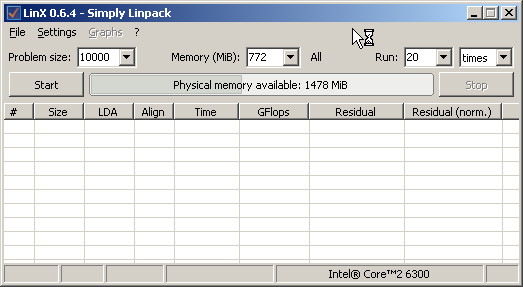
LinX - a simple GUI for Intel Linpack Benchmark.
http://www.xtremesystems.org/forums/showthread.php?201670-LinX-A-simple-Linpack-interface
ラベル:
Windows設定/情報
EFI Shells
EFI Shells
http://efizone.edkoindustries.com/2011/05/efi-shells/
download the x86_64 UEFI Shell and copy it to you EFI SYSTEM PARTITION
or usb stick as /shellx64.efi
UEFI Services
http://software.intel.com/en-us/articles/uefi-services/
UDK2010.UP3.zip
http://en.sourceforge.jp/projects/sfnet_edk2/downloads/UDK2010%20Releases/UDK2010.UP3.P1/UDK2010.UP3.zip/
http://vip.asus.com/forum/view.aspx?board_id=1&model=P8H67-M+EVO&id=20110120020232945&page=1&SLanguage=en-us
Specifically download the "EDK II" Zip. It is also known as "UDK2010" or
soon 2011.
Inside the zip file is the path:
UDK2010.UP3\EdkShellBinPkg\FullShell\X64
and the file:Shell_Full.efi
Copy a UEFI shell and rename it to "shellx64.efi"
UEFI BIOS Utility v1.0.2.0 (UEFI Shell工具)
http://biosengineer.blogspot.jp/2011/08/uefi-bios-utility-v1008-uefi-shell.html
PS:
http://www.coolaler.com/showthread.php/263606-%E6%83%B3%E6%8A%93%E7%BE%8E%E7%BE%8E%E7%9A%84BIOS%E7%95%AB%E9%9D%A2%E5%97%8E%21-MSI-UEFI%E5%9C%96%E5%BD%A2%E5%8C%96%E7%95%8C%E9%9D%A2%E6%88%AA%E5%9C%96%E5%B7%A5%E5%85%B7%E5%8F%8A%E4%BD%BF%E7%94%A8%E6%95%99%E5%AD%B8
http://hi.baidu.com/minexp/blog/item/010dd12abcbc853cd52af188.html
http://efizone.edkoindustries.com/2011/05/efi-shells/
download the x86_64 UEFI Shell and copy it to you EFI SYSTEM PARTITION
or usb stick as /shellx64.efi
UEFI Services
http://software.intel.com/en-us/articles/uefi-services/
UDK2010.UP3.zip
http://en.sourceforge.jp/projects/sfnet_edk2/downloads/UDK2010%20Releases/UDK2010.UP3.P1/UDK2010.UP3.zip/
http://vip.asus.com/forum/view.aspx?board_id=1&model=P8H67-M+EVO&id=20110120020232945&page=1&SLanguage=en-us
Specifically download the "EDK II" Zip. It is also known as "UDK2010" or
soon 2011.
Inside the zip file is the path:
UDK2010.UP3\EdkShellBinPkg\FullShell\X64
and the file:Shell_Full.efi
Copy a UEFI shell and rename it to "shellx64.efi"
UEFI BIOS Utility v1.0.2.0 (UEFI Shell工具)
http://biosengineer.blogspot.jp/2011/08/uefi-bios-utility-v1008-uefi-shell.html
PS:
http://www.coolaler.com/showthread.php/263606-%E6%83%B3%E6%8A%93%E7%BE%8E%E7%BE%8E%E7%9A%84BIOS%E7%95%AB%E9%9D%A2%E5%97%8E%21-MSI-UEFI%E5%9C%96%E5%BD%A2%E5%8C%96%E7%95%8C%E9%9D%A2%E6%88%AA%E5%9C%96%E5%B7%A5%E5%85%B7%E5%8F%8A%E4%BD%BF%E7%94%A8%E6%95%99%E5%AD%B8
http://hi.baidu.com/minexp/blog/item/010dd12abcbc853cd52af188.html
ラベル:
PCハードウェアツール,
Windows設定/情報
再起動するとデスクトップの特定のアイコンの位置が勝手に移動する場合の対処方法
http://support.microsoft.com/kb/882359/jaHKEY_CURRENT_USER\Software\Microsoft\Windows\ShellNoRoam\Bags
デスクトップを整理してみよう
http://support.microsoft.com/kb/882788/JA
aikotanw.zip //常駐しません
http://www.vector.co.jp/soft/dl/winnt/util/se478913.html
KH DeskKeeper2007
http://www.khsoft.gr.jp/software/deskkeeper2007/
ラベル:
Windows設定/情報
Windows® 7 用の Windows® 自動インストール キット (AIK)
http://www.microsoft.com/downloads/ja-jp/details.aspx?FamilyID=696dd665-9f76-4177-a811-39c26d3b3b34
簡単な説明
--------------------------------------------------------------------------------
Windows® 7 用の Windows® 自動インストール キット (AIK) は、Microsoft
Windows® 7 および
Windows Server® 2008 R2 ファミリのオペレーティング システムをインストー
ル、カスタマイズ、
および展開する際に役立ちます。
--------------------------------------------------------------------------------
•サポートされているオペレーティング システムWindows 7 Service Pack
1/Windows Server 2008 R2 SP1
• Windows Server 2003 with Service Pack 2
• Windows Vista SP1
• Windows Server 2008 ファミリ
• Windows 7 ファミリ
• Windows Server 2008 R2 ファミリ
Oscdimg のコマンド ライン オプション
http://technet.microsoft.com/ja-jp/library/cc749036(v=ws.10).aspx
http://www.microsoft.com/downloads/ja-jp/details.aspx?FamilyID=696dd665-9f76-4177-a811-39c26d3b3b34
簡単な説明
--------------------------------------------------------------------------------
Windows® 7 用の Windows® 自動インストール キット (AIK) は、Microsoft
Windows® 7 および
Windows Server® 2008 R2 ファミリのオペレーティング システムをインストー
ル、カスタマイズ、
および展開する際に役立ちます。
--------------------------------------------------------------------------------
•サポートされているオペレーティング システムWindows 7 Service Pack
1/Windows Server 2008 R2 SP1
• Windows Server 2003 with Service Pack 2
• Windows Vista SP1
• Windows Server 2008 ファミリ
• Windows 7 ファミリ
• Windows Server 2008 R2 ファミリ
Oscdimg のコマンド ライン オプション
http://technet.microsoft.com/ja-jp/library/cc749036(v=ws.10).aspx
ラベル:
Windows設定/情報
TestDisk & PhotoRec
新しいバージョンあります。
TestDisk & PhotoRec 7.0 (18 April 2015), Data Recovery
TestDisk パーティション復元
PhotoRec ファイル復元

TestDisk & PhotoRec 6.13 (15 November 2011), Data RecoveryTestDisk & PhotoRec 7.0 (18 April 2015), Data Recovery
TestDisk パーティション復元
PhotoRec ファイル復元

TestDisk & PhotoRec documentation can be found online:
- http://www.cgsecurity.org/wiki/TestDis
- http://www.cgsecurity.org/wiki/PhotoRec
復元ソフト。
ファイル名、ファイルツリー、フォルダが復元されない
順番でファイル名が作られます。
ラベル:
ファイル管理/バックアップ
Drop to DOS
Drop to DOS
http://www.terabyteunlimited.com/downloads-free-software.htm
http://www.terabyteunlimited.com/downloads/DOSDROP.ZIP
With Drop to DOS, you can right click on any folder and choose the Drop
to DOS option to take you to a command prompt within that folder. Works
with Windows 9x/ME/NT/2000/XP.
http://www.terabyteunlimited.com/downloads-free-software.htm
http://www.terabyteunlimited.com/downloads/DOSDROP.ZIP
With Drop to DOS, you can right click on any folder and choose the Drop
to DOS option to take you to a command prompt within that folder. Works
with Windows 9x/ME/NT/2000/XP.
ラベル:
Windows設定/情報
SeaTools
SeaTools
http://www.seagate.com/ww/v/index.jsp?locale=ja-JP&name=SeaTools&vgnextoid=720bd20cacdec010VgnVCM100000dd04090aRCRD
SeaTools for DOS
http://www.seagate.com/staticfiles/support/seatools/SeaToolsDOS223ALL.ISO
http://www.seagate.com/ww/v/index.jsp?locale=ja-JP&name=seatooldreg&vgnextoid=82c7b9a53f7a6110VgnVCM100000f5ee0a0aRCRD
ユーザ ガイドのダウンロード
http://www.seagate.com/staticfiles/support/seatools/user%20guides/SeaToolsDOSguide.JA.pdf
SeaTools for DOS は、包括的で使いやすい診断ツールであり、
デスクトップ コンピュータまたはノートブック コンピュータ上の
データへのアクセスを阻害する要因を簡単に確認できます。
用意されているさまざまなテストを使用して、Seagate または
Maxtor 製ディスク ドライブおよびSeagate 製以外のディスク
ドライブ上にある物理メディアを検査することができます。
たとえば、次のような場合、ハード ディスクドライブ自体には
「問題なし」と判断されます。
* ファイル システムの破損
* ドライバの破損
* マスター ブート レコードの破損
* ウイルスおよびトロイの木馬による攻撃
* スパイウェア、アドウェア、キー ロガー
* ハードウェアの競合
CD書き込みソフト:
http://www.terabyteunlimited.com/downloads-free-software.htm
BurnCDCC™
ラベル:
PCハードウェアツール
Microsoft LAN Manager For DOS
Microsoft LAN Manager For Dos
ラベル:
DOS
登録:
投稿 (Atom)